The Complete Guide to Enterprise Secrets Management, Encryption, and Tokenization in Next.js
Understand HashiCorp Vault, tokenization, and secrets management. Learn how these concepts secure modern Next.js applications, especially in regulated industries.
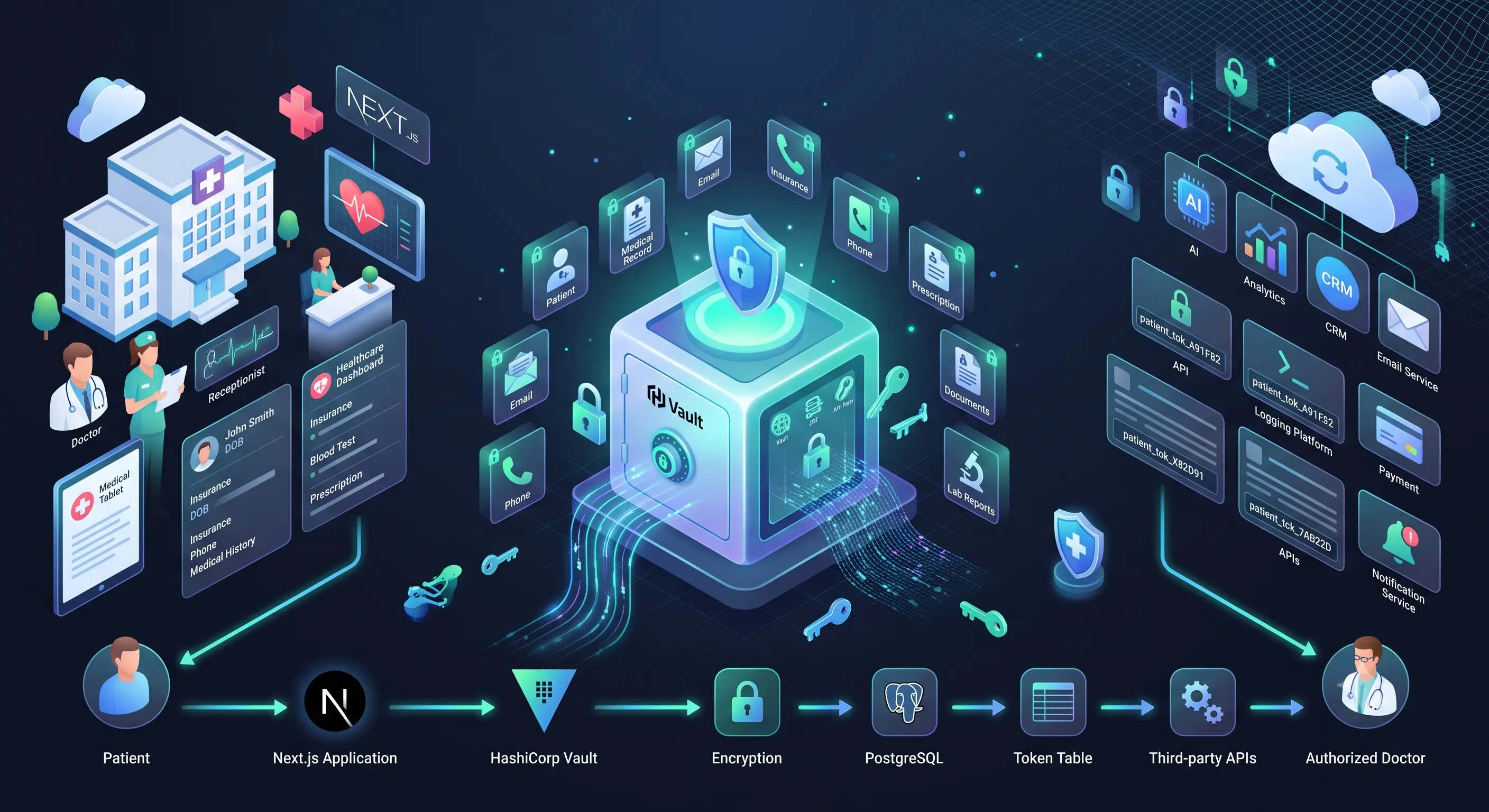
In modern software development, security is a foundational requirement, not an afterthought. When building applications that handle high-stakes data—such as financial transactions or protected health information (PHI)—secure handling of credentials and user data is mandatory.
This guide walks through securing your infrastructure using HashiCorp Vault, advanced tokenization patterns, and cryptographic engines within a production-ready Next.js application architecture.
Introduction: Why Applications Need Modern Security
Every production application requires a way to distinguish between public data and highly confidential assets.
- Sensitive data includes user-identifiable records, trade secrets, and operational assets.
- Secrets are the keys that grant access to this data—such as cryptographic private keys, API credentials, and database passwords.
In simple terms: Data is what you protect; Secrets are what you use to protect it or access it.
While small projects rely on local environment variables (.env files), this pattern breaks down at enterprise scale. Flat text files stored on disk lack an audit trail, do not support dynamic rotation, expose credentials to any process running on the host machine, and scale poorly. In tightly regulated sectors like healthcare (HIPAA) and finance (PCI-DSS), relying strictly on static environment variables introduces catastrophic compliance risks.
Part 1 — Understanding Secrets
A secret is any piece of data that establishes identity or authorization for a programmatic agent or user. Common examples include:
- Database Passwords: Raw text credentials used to authenticate against your persistent data layer.
- JWT Signatures: Keys used to sign and verify JSON Web Tokens for user sessions.
- Stripe/Payment Gateway Private Keys: Tokens used to authorize financial transactions.
- AWS/Cloud Provider IAM Credentials: Keys that govern infrastructure access.
Storing secrets in a Git repository exposes your systems to immediate exploitation. Even in private repositories, secrets persist inside the Git history forever. This introduces massive risks, including secret leakage via developer machine exploits, insider threats from over-privileged staff, and full-system takeovers if a server is breached.
Part 2 — What is HashiCorp Vault?
HashiCorp Vault was designed to manage secrets dynamically, decouple security configurations from runtime code deployments, and provide comprehensive cryptographic audit logs.
Think of Vault as a highly secure physical bank vault. Instead of handing copies of the master warehouse keys to every single courier, you store the master keys inside a secure vault. When a service needs access, it validates its identity against the vault, receives a temporary, short-lived credential, and uses it before it self-destructs.
Vault offers four core capabilities:
- Secrets Management: Centralized storage of static and dynamic keys.
- Dynamic Secrets: Generating cloud/database credentials programmatically on-demand that expire automatically.
- Encryption as a Service (EaaS): Encrypting and decrypting data via API without exposing master keys.
- Identity & Access Policies: Granting precise programmatic permissions mapped via role tokens.
Architecture Flow:
Developer → (Writes Policy) → Vault
Next.js Application → (Authenticates) → Vault → (Generates Dynamic Credentials) → Database
Part 3 — Installing Vault
Vault can run locally in Dev Mode (unencrypted in memory for debugging) or Production Mode (persisted via encrypted storage backends).
Docker Setup
# Pull the latest verified official production image
docker pull hashicorp/vault:latest

# Run a local test server in dev mode exposed on port 8200
docker run --name vault-dev -p 8200:8200 -e 'VAULT_DEV_ROOT_TOKEN_ID=my-root-token' hashicorp/vault
Mac Installation
brew tap hashicorp/tap
brew install hashicorp/tap/vault
Part 4 — Initializing Vault
When a production Vault server boots, it is in a sealed state. It cannot read its storage or service API requests because the master encryption key is encrypted. To instantiate the security lifecycle, you run:
export VAULT_ADDR='http://127.0.0.1:8200'
vault operator init -key-shares=5 -key-threshold=3
This uses Shamir's Secret Sharing Scheme. The initialization splits the master unseal key into 5 distinct cryptographic key shares. To recreate the master key and unseal the engine, any 3 of those 5 shards must be provided. This prevents a single compromise or rogue operator from extracting everything.
Part 5 — Authentication Methods
Vault offers various authentication methods:
- Token Auth: The base engine where explicit tokens are generated.
- GitHub / OIDC: Ideal for human developers accessing the dashboard.
- Kubernetes / AWS IAM: Seamless node validation without hardcoded tokens.
For Next.js applications, AppRole is the recommended authentication method. AppRole mimics machine-to-machine authentication by generating a stable RoleID (username) and a transient SecretID (password) that the application uses to trade for a localized, temporary Vault client token.
Part 6 — Creating Policies
Vault enforces the Principle of Least Privilege: everything is explicitly denied unless a policy document allows it. Capabilities map granular system permissions including read, create, update, delete, and list.
# Permit reading of database metadata secrets
path "secret/data/healthcare/database" {
  capabilities = ["read"]
}

# Permit transit encryption access for data protection workflows
path "transit/encrypt/patient-key" {
  capabilities = ["update"]
}

# Deny everything else explicitly
path "auth/token/create" {
  capabilities = ["deny"]
}
Part 7 — Using Vault in Next.js
To integrate Vault safely into Next.js, ensure all calls run exclusively on the server side (inside Server Actions or Route Handlers). Never expose Vault credentials to the browser.
Bash
npm install node-vault
Reusable Vault Helper (lib/vault.ts):
import vault from 'node-vault';

interface CachedToken {
  token: string;
  expiresAt: number;
}

let tokenCache: CachedToken | null = null;

const vaultClient = vault({
  apiVersion: 'v1',
  endpoint: process.env.VAULT_ENDPOINT || 'http://127.0.0.1:8200',
});

async function authenticateAppRole(): Promise<string> {
  const now = Date.now();

  if (tokenCache && tokenCache.expiresAt > now + 60000) {
    return tokenCache.token;
  }

  const roleId = process.env.VAULT_ROLE_ID;
  const secretId = process.env.VAULT_SECRET_ID;

  if (!roleId || !secretId) {
    throw new Error('AppRole environment components missing.');
  }

  const response = await vaultClient.approleLogin({
    role_id: roleId,
    secret_id: secretId,
  });

  tokenCache = {
    token: response.auth.client_token,
    expiresAt: now + response.auth.lease_duration * 1000,
  };

  return response.auth.client_token;
}

export async function getSecret(path: string) {
  const token = await authenticateAppRole();
  vaultClient.token = token;
  const secretData = await vaultClient.read(path);
  return secretData.data.data;
}
Part 8 — Dynamic Secrets
Static secrets last forever until modified. Dynamic secrets do not exist until explicitly requested. When the application needs PostgreSQL access, Vault connects to the database cluster, creates a unique ephemeral user account, and hands that temporary account back to the Next.js runtime.
Once the lease expires, Vault automatically drops the temporary user. If the web server is compromised, the attacker only acquires a fleeting account that neutralizes long-term exposure.
Part 9 — Encryption Engine
The Vault Transit Secrets Engine handles Encryption as a Service (EaaS). Instead of pulling encryption keys into the application memory layer—where a memory dump could expose them—the application passes plain text to Vault, and Vault returns ciphertext.
Next.js Server → (POST plaintext) → Vault Transit Engine → (Returns ciphertext) → Next.js Server
Part 10 — What is Tokenization?
It is critical to distinguish tokenization from related strategies:
- Encryption: Reversible transformation using a mathematical algorithm and a secret key.
- Hashing: One-way destructive mathematical transformation (e.g., Argon2id).
- Masking: Visually hiding parts of data fields.
- Tokenization: Swapping out a sensitive value completely for a randomly generated, non-mathematically related substitute.
In a healthcare app, instead of writing a patient's Social Security Number directly to the core billing log, the data engine issues a cryptographically random UUID token. The actual sensitive record is kept in a separate vault database.
Part 11 — Building Your Own Tokenization System
To build a custom tokenization engine, separate the infrastructure into a core application schema and an isolated token lookup vault schema in PostgreSQL.
-- Isolated Schema for Token Lookup Table
CREATE TABLE patient_tokens (
    token_id UUID PRIMARY KEY DEFAULT gen_random_uuid(),
    token_value VARCHAR(255) UNIQUE NOT NULL,
    encrypted_phi TEXT NOT NULL,
    created_at TIMESTAMP WITH TIME ZONE DEFAULT CURRENT_TIMESTAMP,
    created_by VARCHAR(100) NOT NULL
);import { randomBytes } from 'crypto';
import { pgClient } from './db';
import { encryptViaTransit } from './vault';
export async function tokenizePatientIdentifier(ssn: string, operatorId: string): Promise<string> {
const tokenValue = 'TK_' + randomBytes(32).toString('hex');
const encryptedPhi = await encryptViaTransit(ssn);
await pgClient.query(
`INSERT INTO patient_tokens (token_value, encrypted_phi, created_by) VALUES ($1, $2, $3)`,
[tokenValue, encryptedPhi, operatorId]
);
return tokenValue;
}Part 12 — Vault vs Skyflow
While Vault is optimized for infrastructure secrets (API keys, short-lived tokens), systems like Skyflow are designed specifically to protect structured sensitive user records (PII/PHI) out-of-the-box.
Feature

Part 13 — Combined Architecture Blueprint
An enterprise approach integrates both frameworks to maximize defense-in-depth:
- User sends data via encrypted payload to Next.js middleware.
- Next.js extracts sensitive markers, querying Vault for single-use schema tokens.
- Vault passes transactional credentials to log the operation to PostgreSQL.
- Non-identifiable tracking tokens are routed downstream to analytics.
Part 14 — AI Applications
When sending user contexts to LLMs, sharing PHI without a Business Associate Agreement (BAA) violates compliance. Redaction pipelines must strip identifying information.
- Bad Prompt: "Analyze the labs for patient John Doe, born 1984-05-12."
- Good Prompt: "Analyze the labs for record identifier: TK_83721aee."
Part 15 — HIPAA Compliance Foundations
Deploying open-source Vault does not automatically make an infrastructure "HIPAA Compliant". Compliance requires a holistic architecture that addresses administrative, physical, and technical safeguards, including strict access controls, formal tracking logs, disaster recovery systems, and verified key rotation workflows.
Part 16 — Production Architecture Infrastructure
A secure enterprise stack scales beautifully when cleanly decoupled:
- Frontend & Server-Side: Next.js Node execution environments.
- Headless CMS: Payload CMS for structured content.
- Persistent Storage: PostgreSQL with Row-Level Security (RLS).
- Telemetry: OpenTelemetry tracking combined with structured JSON logging sinks.
Part 17 — Production Best Practices
- Never expose Vault API endpoints directly to client-side runtimes.
- Enforce short-lived TTL configurations on all AppRole tokens.
- Turn on rigorous audit logging inside Vault.
- Use isolated environment configurations to ensure staging cannot hit production enclaves.
- Bind network connections to strict private VPC groupings.
Part 18 — Critical Mistakes to Avoid
- Hardcoding root keys inside source control managers.
- Failing to evaluate the return state of data transformations.
- Failing to regularly test backup recovery operations and unseal routines.
Part 19 — Frequently Asked Questions
Can HashiCorp Vault completely replace a database like PostgreSQL?
No. Vault is optimized for small, highly sensitive configuration strings and secrets. It is not designed to scale for heavy data workloads.
Can Vault run securely on serverless deployment layers like Vercel?
Yes. By leveraging the AppRole authentication scheme, Next.js edge and serverless runtimes can securely query a remote Vault instance on-demand.
Conclusion
Securing sensitive user applications demands shifting from passive configuration patterns to active cryptographic workflows. By combining HashiCorp Vault for secrets management, strict data tokenization structures, and decoupled network perimeters, your Next.js application is fully equipped to defend user trust and comply with global privacy standards.
Would you like to dive deeper into configuring the Row-Level Security (RLS) policies in PostgreSQL for this specific tokenization architecture?